
Inbox
Inbox Overview
The Inbox section centralizes all replies, bounces, and notifications received from every email account you've connected to Reachingly. Instead of switching between Gmail, Outlook, or multiple inboxes, you can manage and respond to emails directly from one clean, unified interface.
This section is especially useful for reviewing lead replies, tracking delivery issues, and managing conversation follow-ups without leaving the platform.
Below is a full breakdown of the Inbox features.
Unified Inbox View
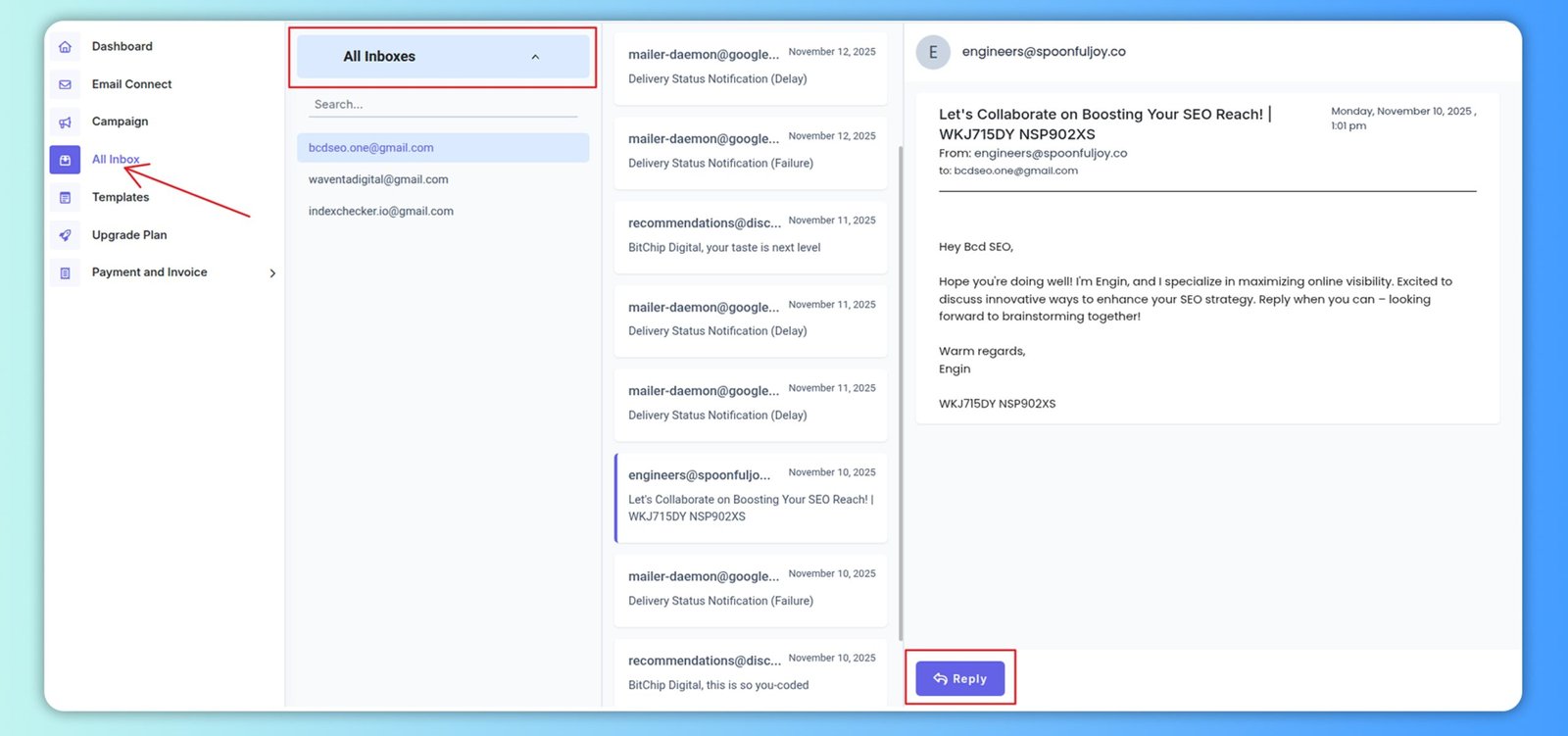
At the top-left of the Inbox page, you'll find All Inboxes — a complete feed of incoming messages from every connected email account.
All incoming replies, bounce notifications, and delivery reports from these accounts flow into one place for easier management.
Account-Specific Filtering
Under All Inboxes, each connected email account is listed individually.
You can click any account to filter and view emails only from that specific sender address.
This is useful when you want to:
- Review performance of each sending identity
- Respond from the correct sender
- Diagnose problems tied to a specific account (bounces, delays, failures)
Search Bar for Quick Lookup
The Search… bar allows you to instantly find messages by:
- Lead email
- Subject line
- Keywords inside the message (based on your indexing)
This speeds up reply tracking and follow-ups when handling large-volume outreach.
Message List Panel
The middle column displays all messages received across your email accounts. Each entry includes:
- Sender name/email.
- Subject line.
- Preview snippet of the email.
- Timestamp.
- Email status such as delivery notifications, bounces, replies, or delays.
This lets you quickly skim for important conversations that require immediate attention.
Email Viewer (Right Side Panel)
When you click any message, it opens in the Email Viewer on the right.
Here you can:
- Read the full email body
- View sender and recipient details
- See the exact time the reply arrived
- Identify which campaign or conversation triggered the message (if included in your setup)
The large reading panel ensures clarity while reviewing long or detailed responses from leads.
Summary
The Inbox section serves as your all-in-one communication hub inside Reachingly. It combines email monitoring, replying, filtering, and troubleshooting into one seamless interface. With support for multiple connected email accounts, it ensures you never miss a lead reply or delivery issue again.